
Running Data Analysis: 3 Things to Check in Your Weekly Report
💡 Key Summary
✅ Three things are enough for running data analysis: weekly distance change, easy-run share, and consistency
✅ Aim to add no more than about 20% over last week, then hold the new level for 2–3 weeks
✅ Spend 5 minutes on Sunday evening, and fix just one off-track box the following week
Pace, cadence, heart rate, elevation—the numbers pile up after every run, and it's hard to know which ones matter. Look at all of them and running can start to feel like homework. This guide is for runners trying running data analysis for the first time, and it picks just three things to check in your weekly report.
1. Is more data better for running data analysis?
Short answer: no. As a beginner, looking at the same few numbers the same way every week helps far more than watching everything. You're tracking to notice how your body changes, not to grade yourself.

Pace on any single run swings with weather, route, and how you feel. That's why a week-by-week trend is easier to judge than one run. These three values show up in nearly every app's weekly report.
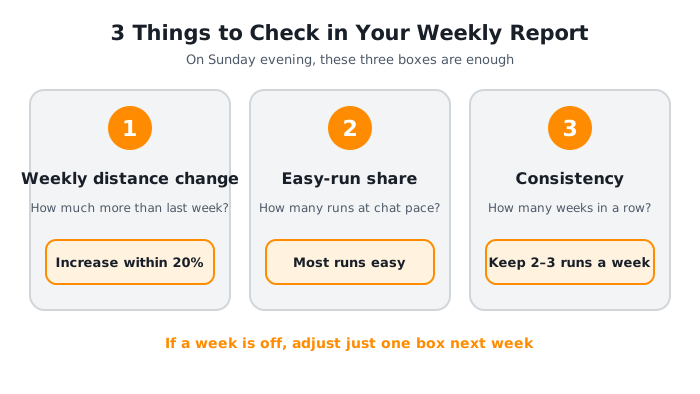
| What to check | Question to ask | Why it matters |
|---|---|---|
| Distance change | How much more than last week? | Avoids sudden jumps |
| Easy-run share | How many runs at chat pace? | Flags overly hard weeks |
| Consistency | How many weeks in a row? | Shows if the habit stuck |

If it looks like too many numbers, check just three boxes. The rest can wait until you get curious!
2. How much can you add to weekly distance?
The first value to check is how your total weekly distance changed. You need to add distance to build fitness, but adding too much at once can outrun what your body has adapted to. So the key question is "what percent more than last week?"
Say you ran 10 km last week. A 20% increase is 12 km. If you ran 15 km this week, that's 50% more, which is worth a second thought. One division is all it takes.
Here's what research says.
| Study | Who | What they found |
|---|---|---|
| Nielsen et al. (2014) | 874 novices, 1 year | Distance-related injuries trended higher above a 30% jump |
| Damsted et al. (2019) | 261 runners, 14 weeks | At day 21, a 20–60% increase meant higher injury risk |
Nielsen's team followed 874 novice runners with GPS watches for a year. Overall injury rates didn't differ significantly between groups. Only for distance-related injuries, such as patellofemoral pain and IT band syndrome, did the group that increased more than 30% trend higher, and that gap wasn't statistically solid (P = 0.07), so the authors call for more testing.
Damsted's team went a step further and followed 261 runners for 14 weeks using GPS watches or smartphones. At day 21, runners who raised weekly distance by 20–60% had a significantly higher injury risk than those under 20%, but there was no difference at days 56 and 98. Both are observational studies, so read them as "a tendency," not "this will get you hurt."
⚠️ Caution
If your knees, shins, or outer hips start aching in a week you added distance, your body's signal comes before any numeric goal. If pain lasts more than two days or hurts when you walk, don't push through. See a sports medicine or orthopedic doctor.
That doesn't mean "never add more than 10%." The running site Active says the 10 percent rule is too general because it ignores experience level and training phase. It suggests beginners hold a volume for two to three weeks before adding more, and experienced runners build in steps closer to 5%.
So here's a practical rule for this guide: aim for no more than about 20% over last week, then hold for 2–3 weeks. If comparing with last week is tricky, how to read your running app's metrics also covers cutting GPS error.
3. How do you read easy-run share and consistency?
The second box is easy-run share. If you ran three times this week, count how many were "chat-pace" runs. A week where every run was hard puts a different load on your body even if the distance is the same.
Here's a simple check for this guide (a feel-based rule, not a number from research).
| Runs this week | Easy runs | Result |
|---|---|---|
| 2 | 2 | Plenty for a beginner |
| 3 | 2 or more | Good balance |
| 4 | 3 or more | Good balance |
| Any | 0 | Make one run slow next week |
For how to set an easy pace, see how to find your easy run pace. This box isn't about measuring speed precisely. It just asks, "Did I have a slow day this week?"

The third box is consistency. How many weeks in a row you've run says more about your habit than one big day. Marathon Handbook suggests beginners start with 2–3 days a week of 20–30 minutes and keep the amount the same for the first two to three weeks while the body adapts.
Here's how to count it.
- Runs this week: 2–3 runs a week is plenty at the beginner stage.
- Weeks in a row: If you skipped a week, don't reset to zero; mark it as a "restart week."
- Reason for a rest: A one-line note, such as travel, weather, or low energy, reveals patterns.

A broken streak is okay. The first day you come back is the biggest record!
4. A 5-minute Sunday evening running data routine
Now turn the three boxes into a routine. Picking a fixed day, like Sunday evening, lets you wrap up the week with no pressure. Five minutes is enough: open your app's weekly report and go in this order.
- Compare this week's total distance with last week's. Check whether it rose more than 20%.
- Count how many of your runs were easy.
- If you ran this week too, add one to your weeks-in-a-row count.
- If any box is off, change just one thing in next week's goal.
💡 Tip
Don't beat yourself up over an off week. If you added a lot of distance, simply repeating the same distance next week is a perfectly good adjustment.
Data tracking that starts out complicated rarely lasts. Set a small goal in the Wittiz app, like "run 3 times this week," then open the report on Sunday evening and compare weekly distance and number of runs with last week. Checking just one number is fine, and the jelly you earn on every run to dress up Moongti can make those five minutes something to look forward to.

Five minutes on Sunday is enough. Next week's you will be glad for today's record!
Frequently Asked Questions (FAQ)
Which numbers should I check first in running data analysis?
Start with the change in total weekly distance compared with last week. Then add how many runs were easy and how many weeks in a row you've run, and that's plenty at the beginner stage. You can look at pace and heart rate once these three feel familiar.
How much can I increase my weekly running distance each week?
There's no fixed answer, but aiming for no more than about 20% over last week and holding the new level for 2–3 weeks is on the safer side. In studies, runners who raised distance by 20–60% or more trended toward higher injury risk, but they're observational and individuals vary. If pain shows up, follow your body's signal over the number.
Is it okay if my running numbers are all over the place each week?
Yes. Pace shifts with weather, route, and how you feel. What matters more is whether distance and number of runs held up over several weeks, not any single run. Start with a small goal like the 30-day running habit challenge and build from there.
Wrapping Up
For running data analysis, weekly distance change, easy-run share, and consistency are enough.
This Sunday evening, take five minutes to compare just one number with last week. Moongti will be running right beside you!
Try it for yourself in the Wittiz app!

References
- Nielsen RO, Parner ET, Nohr EA, Sørensen H, Lind M, Rasmussen S. (2014). Excessive progression in weekly running distance and risk of running-related injuries. J Orthop Sports Phys Ther
- Damsted C, Parner ET, Sørensen H, Malisoux L, Hulme A, Nielsen RO. (2019). The association between changes in weekly running distance and running-related injury preparing for a half marathon. J Orthop Sports Phys Ther
- Active. The 10 Percent Rule: How to Make it Work for You
- Marathon Handbook. How Many Miles Should I Run Each Week?
This article was written by the Wittiz team and includes app-related content. If you have pain or an existing medical condition, please don't push yourself and be sure to consult a medical professional.